They struggle because search engines waste time crawling the wrong pages.
This is something many website owners never notice.
Google does not crawl every page on your website instantly. It uses a limited amount of crawling resources. If those resources get wasted on useless URLs, duplicate pages, or filter parameters, important pages may stay under-crawled for days or even weeks.
That is where robots txt seo becomes important.
A properly optimized robots.txt file helps search engines focus on pages that actually matter. It improves crawl efficiency, reduces unnecessary crawling, and supports better website indexing.
But here is the problem.
Many beginners either:
- ignore robots.txt completely
- or use it incorrectly
And a small robots.txt mistake can seriously hurt rankings.
Some websites accidentally block Google from crawling their entire site. Others block CSS and JavaScript files, which hurts rendering and Core Web Vitals. Large ecommerce websites often waste huge amounts of crawl budget because they never optimize parameter URLs.
Things become even more important after the rise of AI search.
Today, robots.txt is no longer only about Googlebot.
Modern websites also deal with:
- GPTBot
- ClaudeBot
- PerplexityBot
- AI retrieval systems
- generative search crawlers
This means robots.txt now affects:
- traditional SEO
- AI visibility
- AISEO
- GEO optimization
- LLM discoverability
What Is Robots.txt and How Does It Work?
A robots.txt file is a small text file placed in the root folder of a website.
Its purpose is simple:
It tells search engine crawlers which pages or folders they can crawl and which they should avoid.
Think of it like traffic instructions for bots.
When Googlebot visits your website, one of the first things it checks is:
yourdomain.com/robots.txt
Example:
User-agent: *
Disallow: /admin/
Sitemap: https://example.com/sitemap.xml
This setup tells search engines:
- all bots can crawl the website
- except the /admin/ folder
- and the sitemap is available at the provided URL
Simple.
But this small file has a major impact on technical SEO.
Because robots.txt directly affects:
- crawl management
- crawl accessibility
- search engine crawling
- rendering behavior
- server resource usage
- indexing efficiency
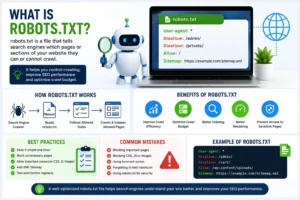
How Googlebot Actually Reads Robots.txt
Many people think Google crawls websites randomly.
It does not.
Googlebot follows a process.
When Googlebot lands on a website, it first checks whether a robots.txt file exists.
If it finds one, it reads the rules inside the file before crawling pages.
Googlebot checks:
- User-agent directives
- Disallow rules
- Allow rules
- Sitemap references
Then it decides:
- what it can crawl
- what it should avoid
- which resources are accessible
This is why a bad robots.txt setup can create serious SEO problems.
For example, if important pages or rendering resources are blocked, Google may not fully understand the website.
Crawling vs Indexing — The Difference Most Beginners Miss
One of the biggest SEO misunderstandings happens here.
People think:
“If I block a page in robots.txt, Google cannot index it.”
That is not always true.
This is because crawling and indexing are different things.
What Is Crawling?
Crawling means search engines visit and read a page.
Googlebot checks:
- content
- links
- images
- CSS
- JavaScript
- metadata
This helps Google understand the page.
What Is Indexing?
Indexing means Google stores the page inside its search database.
Indexed pages can appear in search results.
Robots.txt Mainly Controls Crawling
This is extremely important.
Robots.txt mainly controls crawling — not full indexing.
Example:
User-agent: *
Disallow: /private/
This tells Googlebot:
“Do not crawl this folder.”
But if another website links to that page, Google may still show the URL in search results.
This is why SEO professionals use:
- noindex meta tags
- canonical tags
- X-Robots-Tag
- robots.txt
together for better control.
Understanding this difference is a major part of modern technical SEO.
Why Robots.txt Matters for SEO
Many websites think robots.txt is optional.
Technically, yes.
Strategically, no.
Because robots.txt helps search engines avoid wasting crawl resources.
And this matters more than most people realize.
The Real Problem: Crawl Waste
Most websites do not have indexing problems because Google cannot find their pages.
They have problems because Google wastes time crawling useless URLs.
This is called crawl waste.
Common examples include:
- filter URLs
- session parameters
- duplicate pages
- sorting URLs
- internal search pages
- thin content pages
Large websites often create thousands of these URLs automatically.
Example:
/shoes?color=red
/shoes?color=blue
/shoes?size=10
/shoes?sort=price
To users, these pages may look useful.
But for Googlebot, many of them create duplicate crawling paths.
If Google spends too much time crawling these URLs, important pages may get indexed slower.
This is why crawl optimization matters.
How Robots.txt Improves Crawl Efficiency
A properly optimized robots.txt file helps search engines focus on important pages.
Instead of wasting time on useless URLs, Googlebot can prioritize:
- product pages
- category pages
- blog content
- service pages
- landing pages
This improves:
- crawl efficiency
- indexing speed
- content discovery
- crawl prioritization
And on large websites, this can make a noticeable SEO difference.
Why Ecommerce Websites Need Robots.txt Optimization
Ecommerce websites usually have the biggest crawl problems.
Because they generate massive numbers of URLs through:
- filters
- sorting options
- faceted navigation
- dynamic parameters
- search pages
Without proper crawl control, Googlebot may waste huge amounts of resources crawling low-value pages.
That slows down indexing for important products.
Example:
/laptops?brand=hp
/laptops?brand=dell
/laptops?sort=price
/laptops?color=black
This is why experienced SEO professionals use robots.txt for crawl budget optimization.
What Is a Crawl Budget?
Crawl budget means the number of pages Googlebot is willing to crawl during a visit.
Small websites usually do not need to worry much about crawl budget.
But large websites often do.
Especially:
- ecommerce stores
- news websites
- marketplaces
- large blogs
- enterprise websites
If crawl resources get wasted, important pages may stay undiscovered longer.
That hurts:
- indexing speed
- content freshness
- search visibility
Why Google Does Not Crawl Everything Instantly
Google has limited resources.
It cannot crawl every URL endlessly.
So Google prioritizes crawling based on:
- page importance
- internal linking
- crawl demand
- server responsiveness
- content quality
- crawl history
This is why low-value URLs can become a problem.
Because they compete with important pages for crawl attention.
Important Robots.txt Directives Explained
Now let’s simplify the most important robots.txt rules.
Understanding these directives properly prevents many SEO mistakes.
User-agent Directive
The User-agent directive tells which crawler the rule applies to.
Example:
User-agent: Googlebot
This only targets Googlebot.
To target all bots:
User-agent: *
The * symbol acts as a wildcard.
This is one of the most common robots txt seo optimization directives.
Disallow Directive
The Disallow directive blocks crawlers from specific sections.
Example:
Disallow: /private/
This blocks the private folder.
Another example:
Disallow: /checkout/
This blocks checkout pages.
The robots.txt disallow rule is one of the most powerful crawl-control tools in SEO.
But using it incorrectly can damage rankings.
Allow Directive
The Allow directive lets crawlers access specific pages inside blocked folders.
Example:
Disallow: /private/
Allow: /private/public-file.html
This blocks the folder but allows one file.
This type of setup is common on large websites with complex structures.
Sitemap Directive
You can also place your XML sitemap inside robots.txt.
Example:
Sitemap: https://example.com/sitemap.xml
This helps search engines discover important URLs faster.
Adding a sitemap is considered one of the easiest robots.txt best practices.
Crawl-delay Directive
The Crawl-delay directive tells bots to wait between requests.
Example:
Crawl-delay: 10
This asks bots to wait 10 seconds between crawls.
Some bots respect this rule.
Googlebot usually ignores it.
Wildcards in Robots.txt
Wildcards help create flexible crawl rules.
Example:
Disallow: /*?sort=
This blocks sorting parameters.
Another example:
Disallow: /*.pdf$
This blocks PDF files.
Wildcards are powerful.
But bad wildcard usage can accidentally block important content.
That is why professional SEO teams always test robots.txt carefully.
Why Simple Robots.txt Files Usually Work Better
One thing many SEO professionals learn with experience is this:
Simple robots.txt files usually perform better than overly complicated ones.
Complex setups often create:
- crawl conflicts
- rendering problems
- accidental blocking
- debugging issues
A clean robots.txt file is:
- easier to manage
- safer for SEO
- easier to scale
- easier to troubleshoot
Google itself prefers clean crawl structures.
Real SEO Insight Most Beginners Ignore
Many people focus heavily on keywords and backlinks.
But some websites lose rankings simply because Google cannot crawl important pages efficiently.
This happens more often on:
- ecommerce websites
- large WordPress websites
- websites with faceted navigation
- websites using dynamic URLs
That is why advanced SEO professionals treat crawl management as a major ranking factor.
Because if search engines cannot efficiently access your important pages, even great content may struggle to perform.
Practical Robots.txt Examples for SEO
Understanding robots.txt theory is useful.
But most SEO problems happen during real implementation.
A robots.txt file that looks correct can still create crawl problems if the rules are poorly planned.
That is why practical examples matter.
Allow All Search Engines
Some websites want search engines to crawl everything.
Example:
User-agent: *
Disallow:
This setup allows all crawlers to access the entire website.
Small websites with clean site structures often use this setup because they do not have major crawl budget problems.
But large websites usually need stronger crawl control.
Block the Entire Website
Example:
User-agent: *
Disallow: /
This blocks all search engines from crawling the website.
SEO professionals usually use this on:
- staging websites
- development environments
- private testing sites
But here is the dangerous part.
Many developers forget to remove this rule before launching the website.
And that mistake can destroy rankings overnight.
Some websites lose thousands of visitors simply because Googlebot cannot crawl the site anymore.
This is one of the most common technical SEO mistakes.
Block Specific Folders
Many websites block low-value directories.
Example:
User-agent: *
Disallow: /admin/
Disallow: /checkout/
Disallow: /cart/
These pages usually provide no SEO value.
Blocking them improves crawl management and reduces unnecessary crawling.
Block Parameter URLs
Large websites often create duplicate URLs using parameters.
Example:
/shoes?sort=price
/shoes?filter=size-10
/shoes?color=red
These URLs can waste huge amounts of crawl resources.
SEO professionals often block unnecessary parameter crawling like this:
User-agent: *
Disallow: /*?sort=
Disallow: /*?filter=
This improves crawl prioritization and helps Googlebot focus on valuable pages.
Robots.txt for WordPress SEO
WordPress websites often generate unnecessary crawl paths automatically.
A clean seo robots txt setup helps reduce crawl waste.
Recommended setup:
User-agent: *
Disallow: /wp-admin/
Allow: /wp-admin/admin-ajax.php
Sitemap: https://example.com/sitemap.xml
This setup blocks admin sections while allowing important WordPress functionality.
Many SEO plugins like:
- Rank Math
- Yoast SEO
- All in One SEO
also help manage robots.txt files.
Robots.txt for Ecommerce Websites
Ecommerce websites face some of the biggest crawl efficiency problems.
Because they create:
- faceted URLs
- filter pages
- duplicate product variations
- sorting URLs
- dynamic parameter structures
Without proper crawl control, Googlebot may waste huge amounts of time crawling low-value pages.
Example:
User-agent: *
Disallow: /*?color=
Disallow: /*?size=
Disallow: /*?sort=
Disallow: /checkout/
Disallow: /cart/
This helps reduce duplicate crawling.
And on large ecommerce stores, that can significantly improve website indexing.
Blocking AI Crawlers Like GPTBot
Modern websites no longer deal only with Googlebot and Bingbot.
Now websites also receive visits from:
- GPTBot
- ClaudeBot
- PerplexityBot
- Google-Extended
- AI retrieval crawlers
These bots collect website data for:
- AI-generated answers
- large language models
- generative search systems
Some websites allow these crawlers.
Others block them.
Example:
User-agent: GPTBot
Disallow: /
This blocks GPTBot from crawling the website.
But the decision is not always simple.
Because blocking AI crawlers may reduce future AI visibility.
This is becoming a major topic in AISEO and LLM optimization.
Common Robots.txt Mistakes That Hurt Rankings
Most robots.txt SEO problems happen because of small mistakes.
And small mistakes can create huge ranking issues.
Let’s look at the most dangerous ones.
Accidentally Blocking the Whole Website
This is the biggest robots.txt mistake.
Example:
User-agent: *
Disallow: /
This setup blocks all crawlers.
Developers often use it during website development.
But if the rule remains active after launch:
- pages disappear from Google
- rankings collapse
- indexing stops
Many websites lose traffic simply because nobody checked robots.txt after deployment.
Blocking CSS and JavaScript Files
Years ago, some SEO professionals blocked CSS and JavaScript to save crawl budget.
Today, that is a bad practice.
Google needs these files to properly render pages.
Blocking them can hurt:
- Core Web Vitals
- rendering quality
- mobile usability
- page experience
- crawl understanding
Bad example:
Disallow: /wp-content/
This may accidentally block critical rendering resources.
That is why modern technical SEO focuses heavily on rendering accessibility.
Blocking Important Pages
Some websites accidentally block pages they actually want to rank.
Examples include:
- product pages
- blog posts
- service pages
- category pages
This hurts:
- search engine crawling
- indexing speed
- content discovery
A proper robots txt seo optimization strategy should only block low-value pages.
Incorrect Wildcard Usage
Wildcards are powerful but dangerous.
Bad example:
Disallow: /*.php
This may accidentally block important URLs.
One bad wildcard rule can create major crawl issues.
Professional SEO teams always test wildcard behavior carefully.
Using Robots.txt as a Security Tool
This is another common misunderstanding.
Robots.txt is public.
Anyone can visit:
yourdomain.com/robots.txt
Never use robots.txt to protect:
- customer data
- private documents
- admin security
- sensitive pages
Use proper authentication and security systems instead.
Forgetting to Test Robots.txt Updates
Even a small typo can create large crawl problems.
That is why professional SEO teams always test:
- crawl accessibility
- blocked resources
- rendering behavior
- parameter handling
before deploying robots.txt changes.
This is standard practice during professional SEO audits.
Robots.txt vs Meta Robots vs X-Robots-Tag
Many beginners confuse these three methods.
But they serve different purposes.
Understanding the difference helps avoid major SEO mistakes.
What Robots.txt Controls
Robots.txt mainly controls crawling.
Example:
Disallow: /private/
This tells crawlers:
“Do not crawl this section.”
But remember:
robots.txt does not fully control indexing.
What Meta Robots Tags Control
Meta robots tags mainly control indexing behavior.
Example:
<meta name=”robots” content=”noindex, nofollow”>
This tells search engines:
- do not index the page
- do not follow links
This is different from robots.txt.
What X-Robots-Tag Controls
X-Robots-Tag works mostly for non-HTML files like:
- PDFs
- images
- videos
- documents
It is added through HTTP headers.
This method gives advanced crawl and indexing control.
Why This Difference Matters
Many website owners block pages using robots.txt and expect those pages to disappear from Google.
But that is not always how Google works.
If other websites link to blocked pages, Google may still show the URL in search results.
That is why advanced SEO strategies combine:
- robots.txt
- noindex
- canonical tags
- X-Robots-Tag
together.
Understanding crawling vs indexing is a major part of modern technical SEO.
How Robots.txt Helps Optimize Crawl Budget
Many SEO professionals mention crawl budgets.
But few explain how crawl waste actually hurts rankings.
Google has limited crawl resources.
If Googlebot spends too much time crawling useless URLs, important pages may stay under-crawled.
This becomes a major issue on:
- ecommerce websites
- news websites
- marketplaces
- large blogs
Real Example of Crawl Waste
Imagine an ecommerce website with these URLs:
/laptops?brand=hp
/laptops?brand=dell
/laptops?sort=price
/laptops?color=black
Now imagine thousands of similar URLs.
Googlebot may waste huge amounts of crawling resources on these pages.
Meanwhile:
- important products
- high-value categories
- new landing pages
may get crawled slower.
This hurts indexing efficiency.
Crawl Prioritization Matters
Google tries to prioritize important pages.
But websites also need to help Google.
That is why advanced crawl optimization matters.
A properly optimized robots.txt file helps search engines focus on:
- important products
- categories
- blog content
- conversion pages
instead of low-value duplicates.
Why Simple Robots.txt Files Usually Perform Better
One thing many SEO professionals learn with experience is this:
Simple robots.txt files usually perform better than complicated ones.
Over-engineered setups often create:
- crawl conflicts
- rendering problems
- debugging headaches
- accidental blocking
A simple file is:
- easier to maintain
- easier to scale
- safer for SEO
Google itself prefers clean crawl structures.
Real SEO Insight Most Websites Ignore
Many websites focus heavily on content publishing.
But they ignore crawl efficiency completely.
This creates a hidden SEO problem.
Because even great content struggles if Googlebot wastes crawl resources on useless pages.
That is why experienced SEO professionals treat:
- crawl accessibility
- crawl prioritization
- crawl management
as important SEO foundations.
At Meta Achievers, crawl optimization is often one of the first things checked during large website SEO audits because poor crawl efficiency quietly hurts rankings over time.
Robots.txt Best Practices for Modern SEO
Most robots.txt problems happen because websites try to overcomplicate things.
Many SEO beginners think adding more rules automatically creates better optimization.
Usually, the opposite happens.
Simple robots.txt files are often safer, cleaner, and more effective.
That is why experienced SEO professionals focus on:
- crawl clarity
- clean directives
- resource accessibility
- crawl prioritization
instead of unnecessary complexity.
Keep Robots.txt Simple
A simple robots.txt file is:
- easier to manage
- easier to debug
- safer for SEO
- easier to scale later
Many websites create huge robots.txt files filled with unnecessary directives.
That often creates:
- crawl conflicts
- rendering issues
- accidental blocking
- indexing problems
Google itself recommends keeping robots.txt clean and understandable.
If a rule is not necessary, do not add it.
Add XML Sitemap Inside Robots.txt
Adding your XML sitemap helps search engines discover important pages faster.
Example:
Sitemap: https://example.com/sitemap.xml
This improves:
- website crawling
- URL discovery
- indexing efficiency
- crawl prioritization
Even though sitemaps can also be submitted through Google Search Console, adding them inside robots.txt is still considered a strong technical SEO practice.
Avoid Blocking Important Resources
One of the biggest modern SEO mistakes is blocking rendering resources.
Google needs access to:
- CSS files
- JavaScript files
- images
- APIs
to fully understand pages.
If these resources are blocked, Google may see a broken version of the website.
This can hurt:
- rendering quality
- mobile usability
- Core Web Vitals
- page experience signals
That is why modern SEO robots.txt optimization focuses heavily on rendering accessibility.
Use Comments for Better Management
Comments help teams understand why certain rules exist.
Example:
# Block low-value filter pages
User-agent: *
Disallow: /*?sort=
Comments become extremely useful on large websites where multiple developers and SEO teams manage crawl settings.
Monitor Crawl Behavior Regularly
Robots.txt should not be ignored after setup.
Websites constantly change.
New:
- directories
- parameters
- filters
- templates
- plugins
can create new crawl problems.
That is why professional SEO teams regularly monitor:
- crawl stats
- indexing reports
- server logs
- crawl anomalies
- rendering issues
This is a major part of advanced crawl management.
Combine Robots.txt with Canonical Tags Properly
Some websites try solving every SEO issue with robots.txt alone.
That rarely works well.
Modern SEO usually combines:
- robots.txt
- canonical tags
- noindex directives
- XML sitemaps
together.
Example:
- robots.txt controls crawling
- canonical tags handle duplicate content
- noindex controls indexing behavior
This layered approach creates stronger crawl control.
Robots.txt and AI Crawlers
SEO is changing quickly.
A few years ago, robots.txt mostly affected Googlebot and Bingbot.
Today, websites also interact with:
- GPTBot
- ClaudeBot
- PerplexityBot
- Google-Extended
- AI retrieval systems
These bots help train:
- AI search engines
- large language models
- generative AI systems
This changes how websites think about crawl accessibility.
What Are AI Crawlers?
AI crawlers collect publicly available web content for:
- AI-generated answers
- machine learning models
- conversational search systems
- retrieval systems
Unlike traditional search crawlers, AI bots may use content differently.
This creates new concerns around:
- content ownership
- AI visibility
- crawl permissions
- AI discoverability
Should Websites Block AI Crawlers?
There is no universal answer yet.
Some websites block AI bots because they want:
- stronger content control
- reduced AI scraping
- intellectual property protection
Others allow AI crawlers because they want:
- future AI visibility
- brand mentions in AI answers
- stronger AI discoverability
This is becoming a major discussion in modern AISEO.
The Risk of Blocking AI Crawlers
Some websites believe blocking AI bots protects content completely.
But there is another side.
If AI systems cannot access your website, your visibility inside future AI-generated search experiences may decrease.
This matters because search behavior is changing fast.
Users increasingly ask questions directly inside:
- ChatGPT
- Gemini
- Perplexity
- AI assistants
That is why crawl accessibility now affects more than traditional rankings.
How AI Search Changes SEO Strategy
Traditional SEO focused heavily on:
- rankings
- keywords
- backlinks
Modern search is moving toward:
- AI-generated answers
- conversational search
- retrieval-based discovery
- semantic understanding
This means websites now need:
- stronger topical authority
- clearer semantic structure
- better contextual relevance
- improved crawl accessibility
And robots.txt plays a role in all of this.
Why Crawl Accessibility Matters More Now
If search engines and AI systems cannot efficiently access important pages:
- content visibility decreases
- indexing slows
- retrieval becomes weaker
This is why modern technical SEO now overlaps with:
- AISEO
- LLM optimization
- semantic SEO
- generative search optimization
The websites that manage crawl accessibility properly may perform better in future AI-driven search systems.
How to Create a Robots.txt File Properly
Creating robots.txt is technically simple.
But strategy matters.
Step 1: Decide What Should Not Be Crawled
Most websites should consider blocking:
- checkout pages
- cart pages
- internal search results
- unnecessary parameter URLs
- admin sections
But avoid blocking:
- important content
- rendering resources
- valuable landing pages
Step 2: Create the File
Use a plain text editor.
Save the file as:
robots.txt
The filename must stay lowercase.
Step 3: Upload It to the Root Directory
Your robots.txt file must be placed here:
example.com/robots.txt
If placed elsewhere, crawlers may ignore it.
Step 4: Add Sitemap
Example:
Sitemap: https://example.com/sitemap.xml
This improves crawl efficiency and content discovery.
Step 5: Test Before Publishing
Never publish robots.txt changes without testing.
One wrong line can block important sections of the website.
Professional SEO teams always validate crawl behavior first.
How to Test and Validate Robots.txt
Testing robots.txt is one of the most overlooked SEO tasks.
But it prevents serious crawl problems.
Google Search Console
Google Search Console helps identify:
- crawl accessibility issues
- blocked pages
- robots.txt errors
- indexing problems
It is one of the best free tools for monitoring crawl behavior.
TechnicalSEO Robots.txt Validator
This tool helps test:
- wildcard behavior
- blocked URLs
- crawler access
- directive conflicts
It is useful for debugging advanced crawl setups.
Screaming Frog
Screaming Frog helps simulate crawler behavior.
SEO professionals use it to identify:
- blocked pages
- crawl waste
- rendering problems
- internal linking issues
This is extremely useful during technical SEO audits.
Another Important SEO Reality
Many websites think:
“More pages = more traffic.”
That is not always true.
Sometimes:
fewer crawlable low-quality pages improve SEO performance.
Because Google can focus more clearly on:
- important content
- high-quality landing pages
- valuable products
- conversion-focused pages
This is one reason modern SEO now focuses heavily on:
- content quality
- crawl quality
- indexing quality
instead of just publishing more URLs.
FAQs
Can a bad robots.txt file cause traffic drops?
Yes. A bad robots.txt setup can stop Googlebot from crawling important pages. If critical sections become blocked accidentally, rankings and organic traffic may drop very quickly.
Why do blocked pages still appear in Google search?
Robots.txt mainly controls crawling, not full indexing. If other websites link to blocked pages, Google may still show those URLs in search results even without crawling the page content.
Should small websites worry about crawl budgets?
Usually, crawl budget becomes a bigger issue on large websites. But small websites with messy URL structures, duplicate pages, or poor internal linking can still create unnecessary crawl waste.
Is blocking filter URLs good for SEO?
In many ecommerce cases, yes. Filter URLs often create duplicate crawling paths that waste crawl resources. But blocking the wrong filters can also remove useful pages from crawling, so strategy matters.
Can robots.txt improve indexing speed?
Indirectly, yes. When search engines spend less time crawling useless pages, they can focus more on important URLs. This improves overall crawl efficiency and content discovery.
What happens if CSS or JavaScript is blocked in robots.txt?
Google may struggle to fully render the page correctly. This can hurt mobile usability, rendering quality, and Core Web Vitals, which may affect SEO performance.
Should websites allow GPTBot and AI crawlers?
It depends on the website’s goals. Some brands allow AI crawlers for future AI visibility, while others block them to protect content usage. There is no universal strategy yet.
Can robots.txt protect private pages from hackers?
No. Robots.txt is public and visible to everyone. It should never be used as a security tool for sensitive files or confidential data.
Final Thoughts
Robots.txt may look like a small file, but it has a big impact on how search engines crawl and understand your website. A properly optimized robots.txt setup helps Google focus on important pages instead of wasting crawl resources on useless URLs.
As SEO and AI search continue evolving, crawl accessibility is becoming more important than ever. Websites that manage their crawl budget, technical SEO, and indexing efficiency properly will have a stronger chance of improving both search rankings and future AI visibility.